Rule Types
When you create a collection in Smart Collections Builder, you need to tell the app how to evaluate your rules. That's what Rule Types are all about—they determine whether products need to match all of your conditions, just one, or a specific combination.
Choosing the right rule type is key to getting exactly the products you want in your collection.
The Three Rule Types
Smart Collections Builder offers three ways to combine rules:
| Rule Type | Logic | A product is included when... |
|---|---|---|
| Match All | AND | It matches EVERY rule you set |
| Match Any | OR | It matches AT LEAST ONE rule |
| Combination | AND/OR mix | It matches your custom grouped conditions |
Let's look at each one in detail.
Match All (AND Logic)
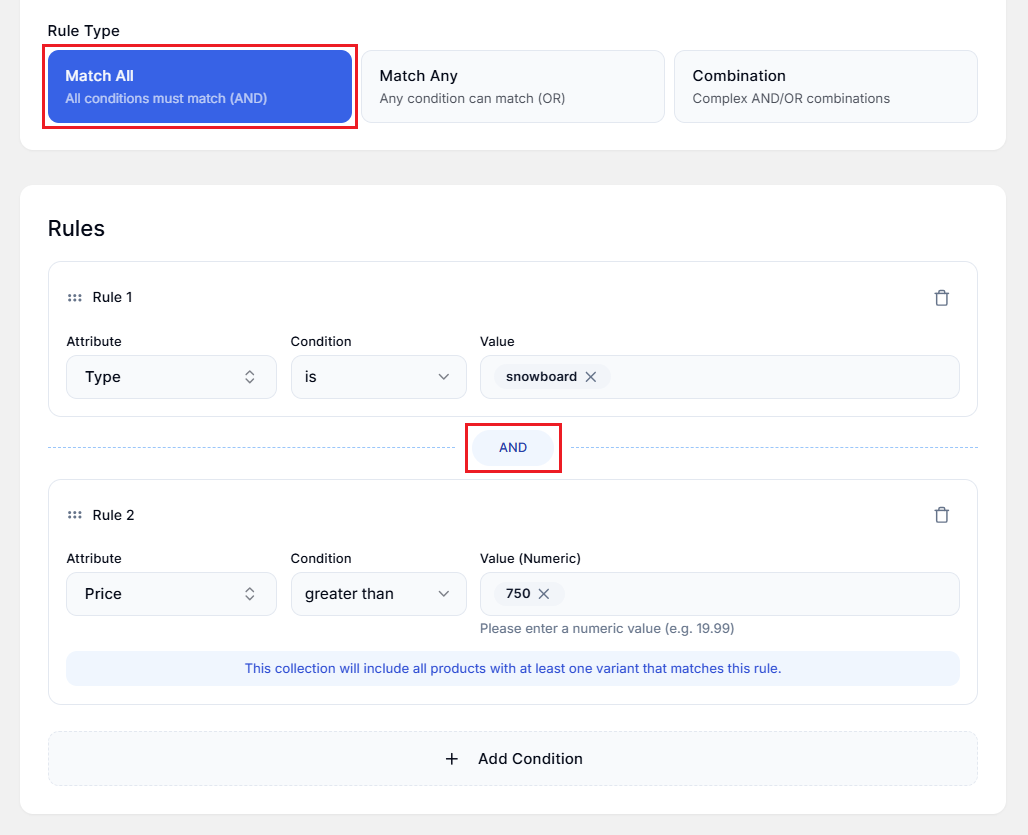
With Match All, a product must satisfy every single rule to be included in the collection. Think of it as a checklist—every box needs to be checked.
Example
Say you want a collection of premium snowboards priced over $750. You'd set up:
Rule 1:
Attribute → Type
Condition → is
Value → snowboard
Rule 2:
Attribute → Price
Condition → greater than
Value → 750
Result: The collection only includes products that are BOTH snowboards AND priced over $750. A snowboard priced at $500? Not included. A $900 jacket? Also not included.
When to Use Match All?
- Creating specific, narrowly-defined collections.
- When products need to meet multiple criteria.
- Filtering down to a precise subset of inventory.
Match Any (OR Logic)
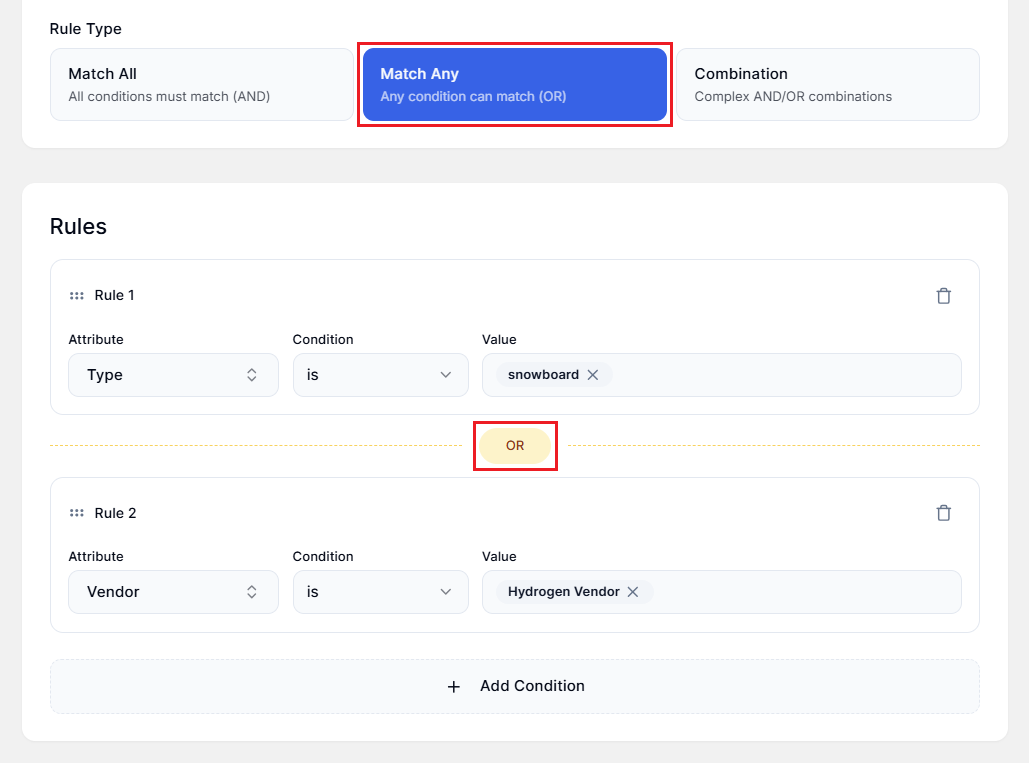
With Match Any, a product is included if it matches just one of your rules. It's more inclusive—think of it as "this OR that OR the other thing."
Example
Say you want a collection that includes all snowboards OR anything from a specific vendor:
Rule 1:
Attribute → Type
Condition → is
Value → snowboard
Rule 2:
Attribute → Vendor
Condition → is
Value → Hydrogen Vendor
Result: The collection includes ANY product that's a snowboard, plus ANY product from Hydrogen Vendor—even if it's not a snowboard.
When to Use Match Any?
- Creating broad collections that pull from multiple categories.
- When products can qualify through different paths.
- Building "featured" or "spotlight" collections from various sources.
Combination (AND/OR Mixed Logic)
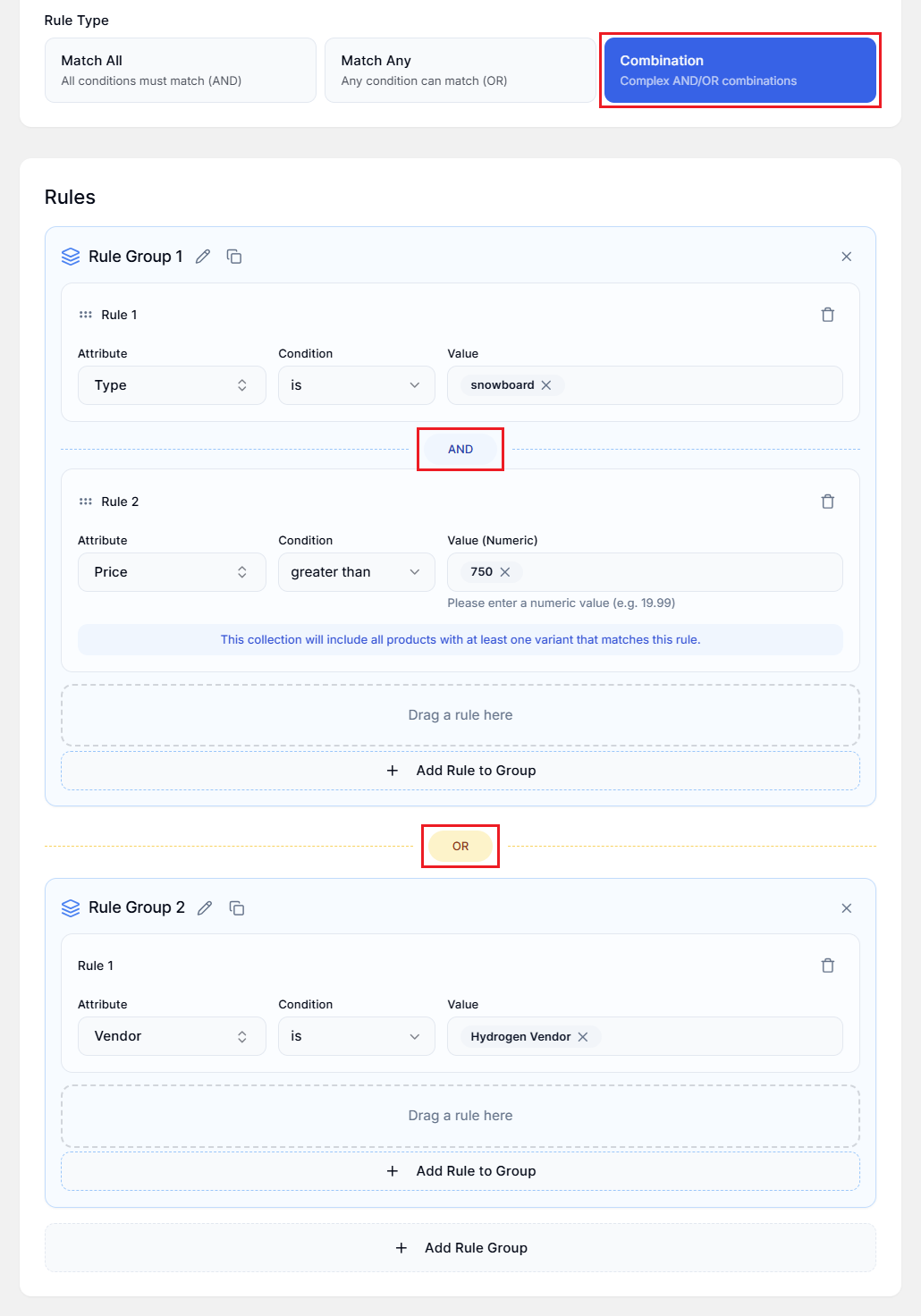
Here's where Smart Collections Builder really shines. Combination mode lets you create complex rules by grouping conditions together—using AND logic within groups and OR logic between groups.
This is perfect for sophisticated merchandising needs that Shopify's built-in collections simply can't handle.
How It Works?
- You create Rule Groups.
- Rules within a group use AND logic (all must match).
- Groups are connected with OR logic (match any group).
- You can drag and drop rules to reorganize them.
Note: To use drag-and-drop, you need at least two rules in a group.
Example
Say you want a collection that includes:
- Premium snowboards priced over $750, OR
- Anything from Hydrogen Vendor
You'd create two rule groups:
Rule Group 1 (AND):
Rule 1: Type → is → snowboard
Rule 2: Price → greater than → 750
Rule Group 2:
Rule 1: Vendor → is → Hydrogen Vendor
Result: The collection includes products that match BOTH rules in Group 1 (expensive snowboards), OR products that match Group 2 (Hydrogen Vendor items).
When to Use Combinations?
- Complex merchandising requirements.
- When you need "AND within groups, OR between groups."
- Building collections that would require multiple simple collections otherwise.
- Advanced filtering that mirrors real business logic.
Choosing the Right Rule Type
Here's a quick decision guide:
| You Want... | Use This Rule Type |
|---|---|
| Products that meet ALL criteria | Match All |
| Products that meet ANY criteria | Match Any |
| Complex logic with grouped conditions | Combination |
Can You Change Rule Types Later?
Absolutely! If you've already created a collection and realize you need different logic, just edit the collection and change the Rule Type. The app will resync the collection with the new logic.
Pro Tips
- Start simple: If Match All or Match Any works, use it. Only use Combination when you truly need mixed logic.
- Test with a small catalog: When experimenting with complex rules, it helps to verify results with a smaller product set first.
- Use clear naming: Name collections so you remember what rules are in play (e.g., "Premium Winter Gear - AND Logic")
Have questions about rule types? We're here to help! Reach out via live chat or email us at support@bevycommerce.com.